

Rather than a review, this is a ‘hands-on’ since the HomeAgent hardware isn't in retail channels yet.
So much has happened since it's difficult to comprehend that Ugreen only sold its first NAS in 2021 exclusively in China, but its global retail products only arrived in 2024.
Since the initial five NASync models, we’ve seen the incredible iDX6011, HD products, GT series updates for the DXP machines, Pro series additions, and a new DXP8800 Ultra that I covered recently.
Now, alongside those thirteen NAS devices, Ugreen has taken another branch and created the HomeAgent series. It combines some of the development path of the UGOS Pro, a basic NAS hardware platform, with a device that’s made to create a bubble of AI away from the internet to handle a variety of agentic tasks.
Initially available only via pre-order and Kickstarter, with a retail release in early 2027, there are three models: HomeAgent HA100 reviewed here, the HA100 Pro for those who want more AI performance, and the MasterAgent MA100 that pushes local AI power to the max.
Alongside the HomeAgent devices, Ugreen has also created a collection of peripheral devices, including three AI-connected cameras, a smart speaker, and a connected colour E-Paper picture frame.
While the launch ecosystem may seem modest, Ugreen will likely expand this collection in the near future.
These systems are designed to address issues that smart home (or business) users face when technology is so fragmented. Typically, people have components from different brands, Google and Amazon, alongside peripherals made by others, and they try to bring it together using a platform like Home Assistant run on a NAS or dedicated PC.
The Ugreen HomeAgent takes all that technology and control, adds AI components that will still work even if the internet isn’t functional and distils it into an attractive white plastic box.
Instead of needing regular attention, the AI in the HomeAgent is meant to run the NAS and connected peripherals without intervention, and it can tell you if a problem is beyond its ability to address.
Asus Ascent GX10: Price and availability
- How much does it cost? From $799
- When is it out? Available for pre-order, shipping in February 2027
- Where can you get it? Via Kickstarter
Ugreen has offered some amazing deals when launching NAS on Kickstarter, and this hardware is no exception.
The HA100 costs only $799 at the pre-launch early-bird price, down from a $1,599 MSRP. Conversely, the HA100 Pro is $2,699 on a $5,399 MSRP, and the MA100 is $9,999 on a $19,999 MSRP.
The Kickstarter initiates on November 17th, but Ugreen is taking reserve deposits before then, where you get a 50% discount on the HA100, HA100 Pro and MA100.
After the Kickstarter is launched, early bird pricing will be 40% off, and presumably full MSRP will be the norm after February 2027, when the Kickstarter ends.
To get those prices, you need a $50 reserve deposit for the HA100 and HA100 Pro, and a $200 deposit for the MA100. As an additional sweetener, Ugreen is bundling the SynCare ID500 Pro camera with the HA100 and HA100 Pro (MSRP $149) and four 8TB NAS drives with the MA100, which must easily be worth another $1200.
The HA100 pricing is for a NAS with only three HDD bays and 16GB of RAM. That said, it includes an AI accelerator, which makes it hard to compare to Ugreen’s DXP and iDCX series machines.
Therefore, if you are primarily looking for a NAS, then this might not be the product range for you; if you are more interested in AI, it might be.
I should also mention the high-end MA100, which I believe has four drive bays and is built around an NVIDIA accelerator. Considering it was possible a few months ago to get an NVIDIA DGX Spark system for around $3000, that does seem pricey, but it should offer similar performance.
However, the ASUS Ascent GX10 I was referring to now costs twice as much, and that’s for a machine with 128GB of RAM, whereas the MA100 has 256GB. So, at the Kickstarter price, the MA100 might be a bargain.
What I can say with some certainty is that no other NAS brand is making anything remotely like this right now, although there is some overlap with the DXG Spark platforms.
Ugreen HomeAgent HA100: Specs
Item | Spec |
HomeAgent Model: | HA100 |
CPU: | Rockchip RK3588 (8 Cores, 4x Cortex-A76 + 4x Cortex-A55 |
GPU: | ARM Mali-G610 MP4 |
NPU: | Rockchip RK1828 (6 TOPS) |
RAM: | 16GB LPDDR5 (not expandable) |
Internal Storage: | 64GB eMMC for UGOS Pro |
SATA Storage: | 3x 3.5/2.5-inch SATA III (2x NAS, 1x Surveilance Drive) |
M.2 Storage: | 1x M.2 NVMe PCIe Gen 3 x1 |
Ports: | 1x USB-C 3.2 Gen 1 (5Gbps) |
| 2x USB-A 3.2 Gen 1 (5Gbps) |
| 1x HDMI 2.0b |
| 1x SD 3.0 slot (front) |
Networking: | 1x 2.5GbE RJ45 4x PoE 10/100Mbps (Max power 65W) |
Wireless: | Thread 1.4 ZigBee 3.0 Bluetooth 6.0 Bluetooth 5.3 |
OS: | UGOS Pro |
File Systems: | EXT4, Btrfs |
Maximum Capacity: | 68TB (2x 30TB SATA) + 1x 8TB M.2) |
RAID Modes: | JBOD/Basic/RAID 0/RAID 1 |
Microphone: | Omnidirectional 4-microphone array |
Speakers: | 2x 5W |
PSU: | 20V 9A 180W external |
Power Consumption: | 42.36 W (drive access), 18.12 W(drive hibernation) |
Dimensions: | 192 x 218 x 251mm (LxWxH) |
Weight: | 520g (including PSU and drives) |
Warranty: | 2 Years |
Ugreen HomeAgent HA100: Design
- Large enclosure
- PoE switch inside
- Three HDD bays, dual-function storage
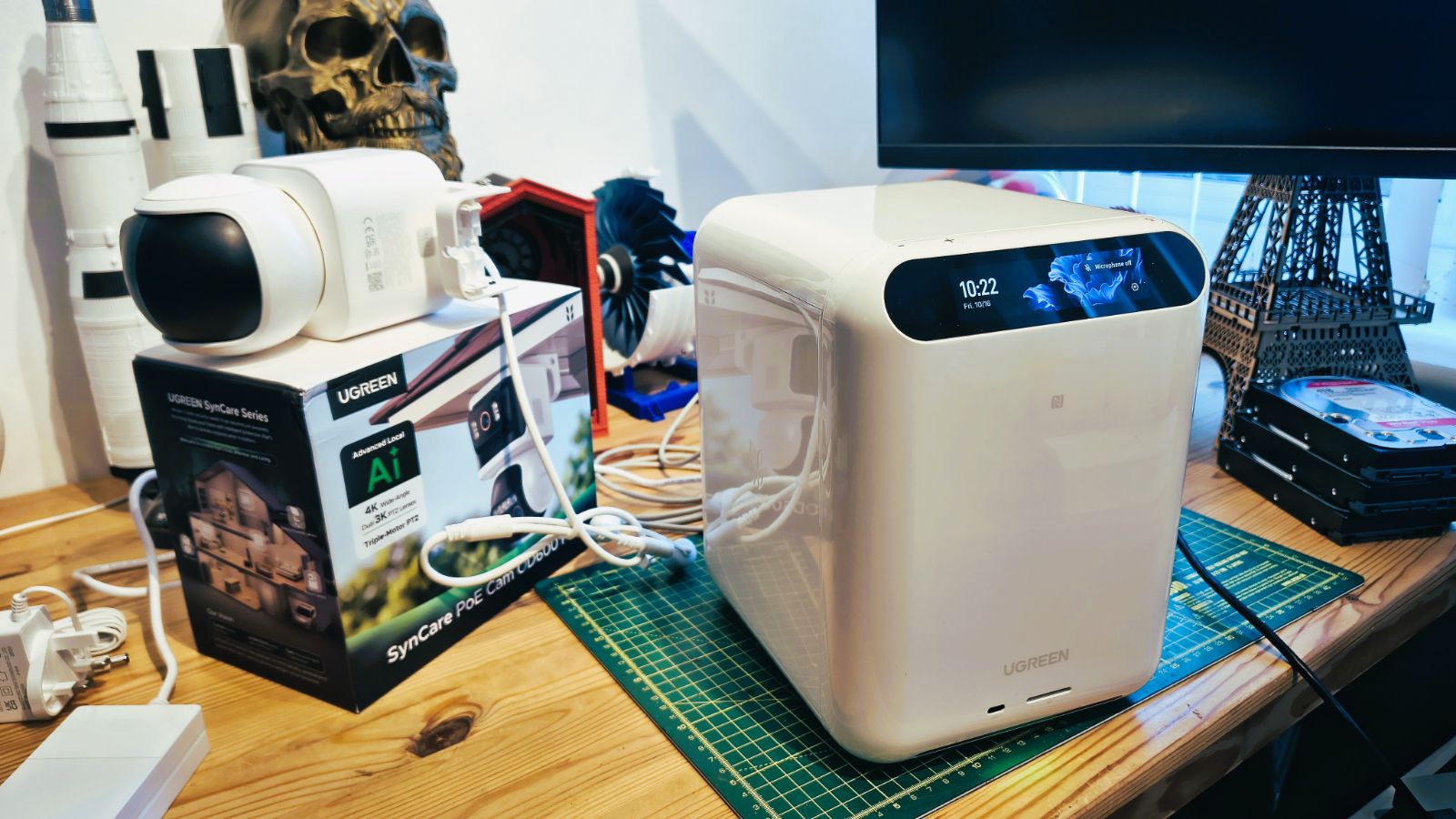
The first thing that strikes you about the HA100 is how much bigger it is than a typical four-bay NAS, like the DXP4800 Pro or Plus.
Standing about 218mm high and 251mm deep, this is a large, shiny white box that feels substantial when you pull it from its packaging.
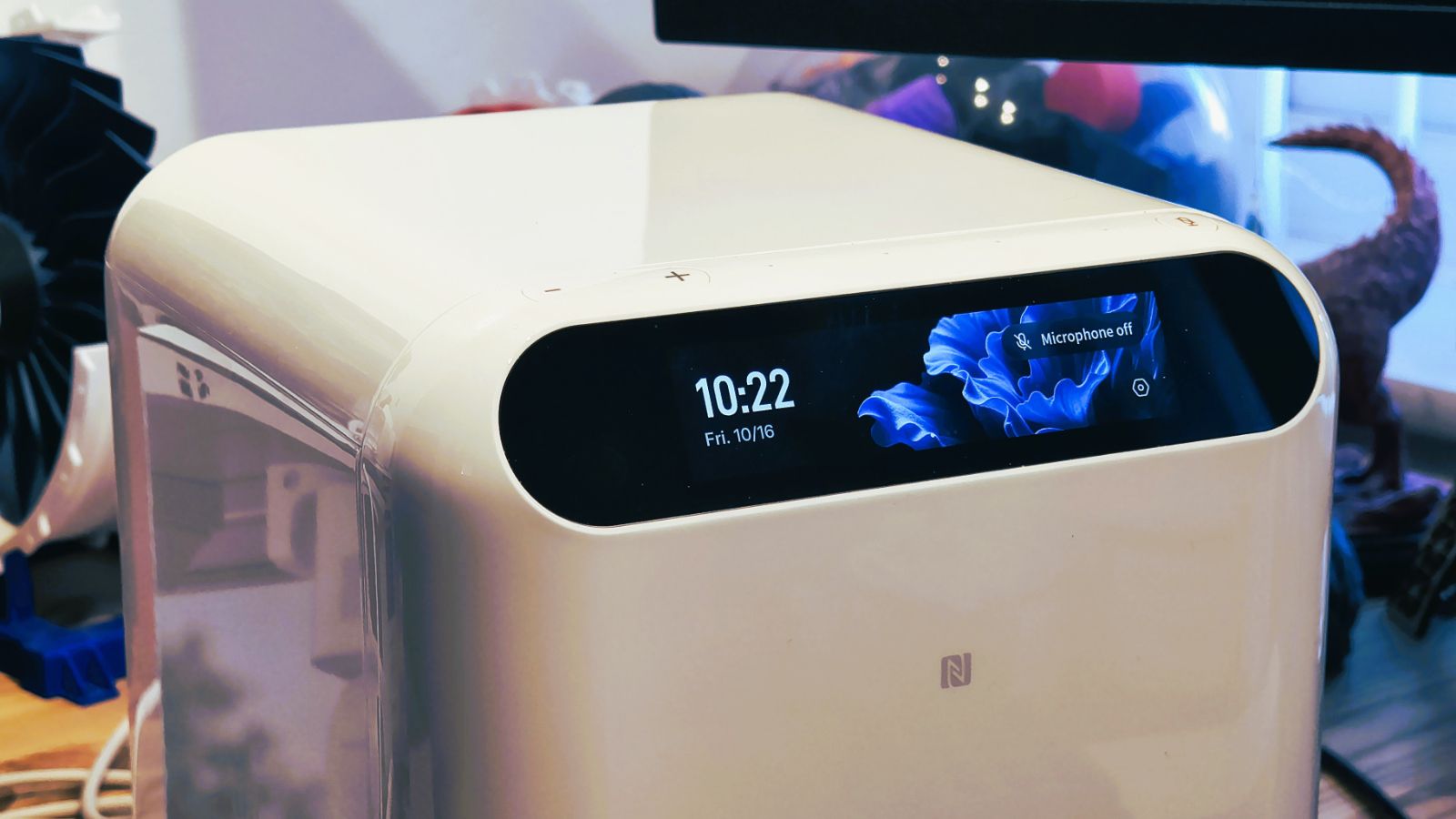
On the top front is a wide OLED panel, which I think is the same one that I saw on the iDX6011 Pro, but on its side. This acts as both a touch-sensitive menu and can also display various useful information.
Just above this on the left is a volume rocker, and to the right is a microphone mute, which hints that you can talk to this device, or rather the AI running on it.
The front face also has a single USB-C port and an SD card slot; the USB-C is 3.2 Gen 1 (5Gbps), and the SD card reader is SD 3.0 spec. And just below them is an LED that projects different colours to indicate whether there is a problem or all is well.
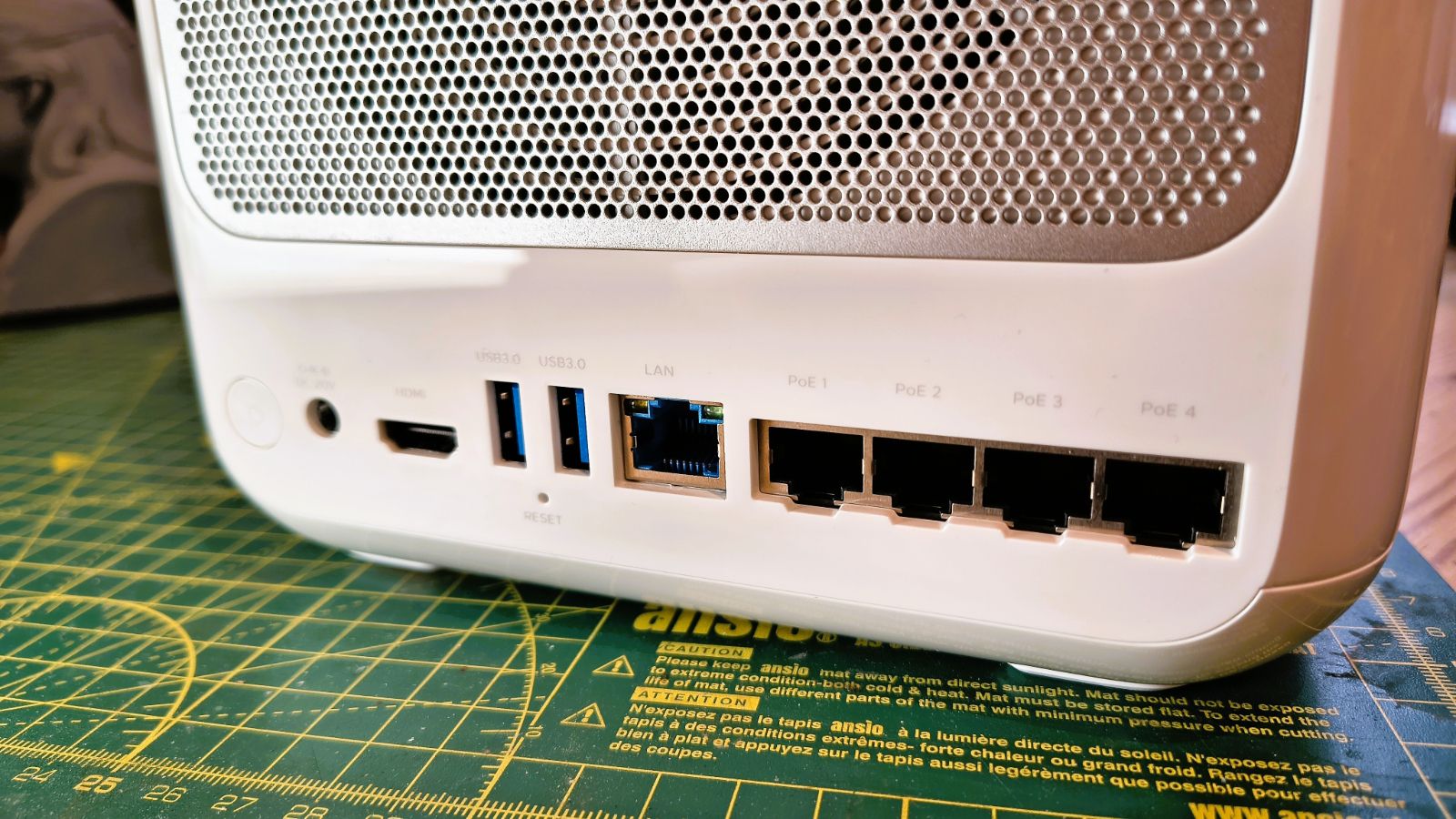
On the back, there are two USB-A ports, both 5Gbps, a single 2.5GbE RJ45 LAN port and a four-port PoE 10/100Mbps (Max power 65W) switch. That last feature matters for the unit's surveillance function, since you can directly connect and power PoE cameras.
Finally, we come to drive bays, and the HA100 isn’t quite like anything else Ugreen has made so far, though it has minor similarities to the DH4300 in that it’s a top loader.
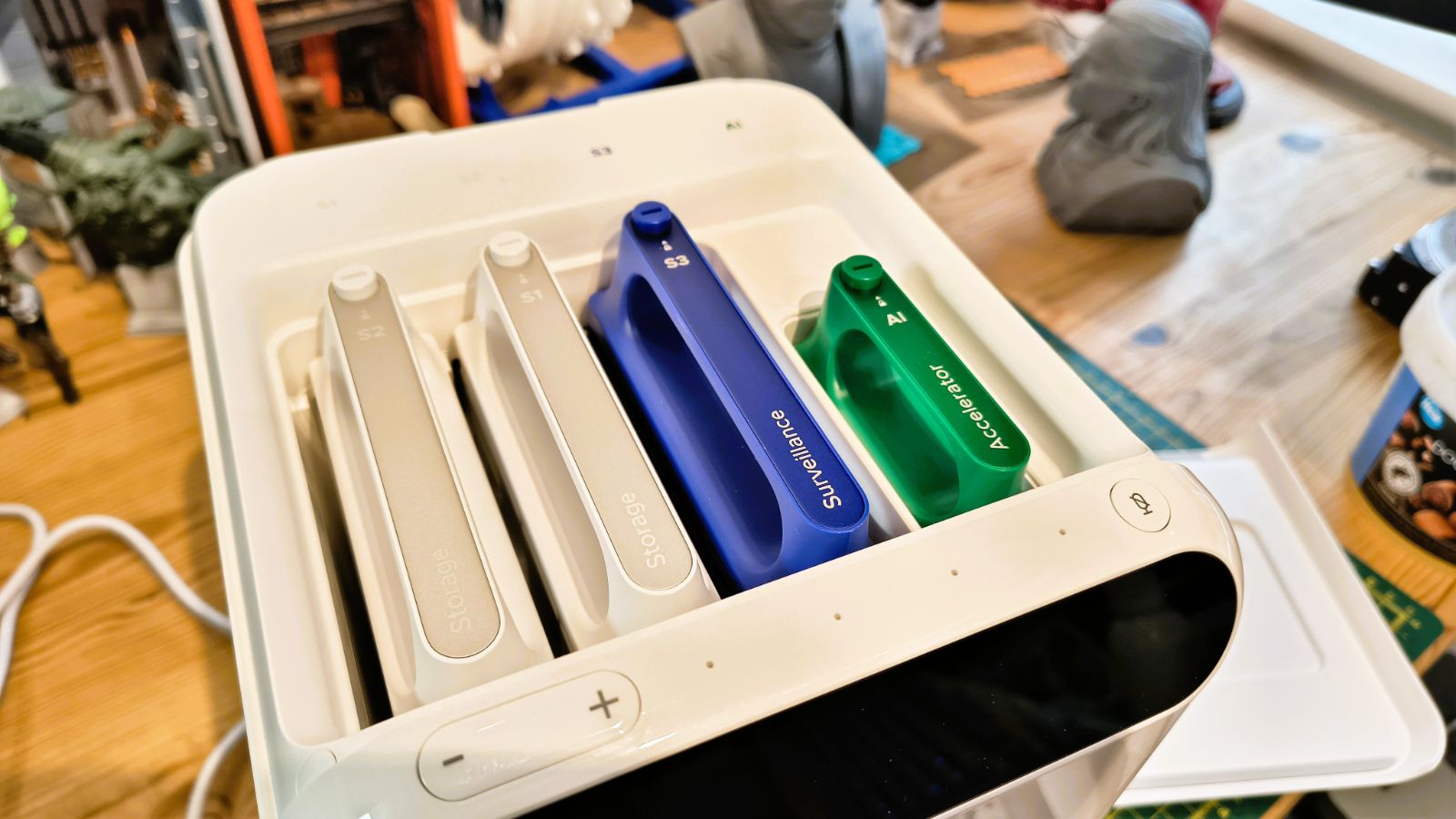
The top of the HA100 is magnetically attached, making it easily removed to reveal four bays, with three for hard drives and one for an AI accelerator. These are all lockable and colour-coded. The drives have plastic tool-less cradles if you use 3.5-inch media, and screws if you insist on 2.5-inch HDDs.
But what genuinely surprised me is that two of the HDD bays are allocated to NAS storage, and one, coloured purple, is meant to hold a surveillance-tailored drive. I’ve never seen that predefined on a NAS before, but it does reveal one way that Ugreen envision the HA100 being used.
On the underside of the unit, there is also a removable panel that provides access to an M.2 NVMe PCIe Gen 3 x1 slot, which can be used for caching or a high-performance drive for AI models. You are recommended to use it for the latter.
I won’t be tempted to say the HA100 breaks the NAS mould, but it certainly strays off the beaten NAS path, and in some truly interesting ways.
Ugreen HomeAgent HA100: Features
- ARM SoC
- T20 accelerator
- M.2 and PCIe slots
- No upgrade path in series
Given how many newer Ugreen NAS designs use mobile Intel platforms, it seems odd that none of the HomeAgent hardware uses them.
Even more curiously, the three machines (HA100, HA100 Pro, and MA100) all use different ARM SoCs, completely eliminating any consistency.
Of these, the Rockchip RK3588 in the HA100 is the most recognisable, since it's an Armv8.2-A platform with four each of Cortex-A76 plus and Cortex-A55 cores, much like is often found in phones or tablets.
The HA100 Pro is rocking more cores with an Armv9.2-A platform, the 12-core CIX P1 CP8180. SoC diversity is completed with the MA100 that uses a fourteen-core NVIDIA Jetson Thor T5000.
Similarly, GPU power scales by level, starting with the Arm Mali-G610 MC4 on the HA100, moving to the Arm Immortalis-G720 MC10 on the HA100 Pro, and ending with the 2,560-core NVIDIA Blackwell GPU with 5th-generation Tensor Cores on the MA100. This helps explain why MA100 hardware costs so much, but it's hardly a smooth power ramp.
When the CPU, GPU, and NPU all work on an AI task, the HA100 has an advertised total AI performance of 26 TOPS (6 TOPS platform, 20 TOPS T20 accelerator).
That’s actually not enough to run CoPilot locally on a PC, but it can still run some LLM models adequately. But the total performance of the Pro model with an as-yet-unnamed accelerator is a much more sprightly 205 TOPS, and the MA100, as you might expect, has up to 2,070 FP4 sparse TFLOPS.
So, in summary, for AI, it scales 10x and then 1000x, approximately. Those are not exactly incremental jumps.
It also makes the HA100 look decidedly underpowered, although the Kickstarter entry-level pricing does make it attractive to someone who wants to explore local AI.
What confuses me is that HA100 or HA100 Pro owners have no upgrade path, since the systems aren’t interchangeable in any way. As I assume you can’t put the accelerator from the HA100 Pro in the HA100, what was the point of having the accelerators removable? And why make the MA100 the only one with four bays?
Surely, if all the cases were the same, Ugreen could redirect production more easily than it does now?
I understand that part of the purpose of using Kickstarter in this instance isn’t about funding; it's about getting indicators of demand for each model. But if you’ve already made too many black four-bay MA100 cases for demand, it's too late to repurpose them for the HA100 Pro. But then Ugreen already undermined that flexibility with the three-bay designs.
And, here’s the real rub. If you get a low-profile RTX 460 video card and mount it in one of the DXP or iDX machines, then that can generate 242 TOPS of AI processing, making that NAS more powerful than the HA100 Pro. How well that would work in reality is debatable, and I’ve never tried it, but the issue is obvious if you look at the costs.
In a similar vein, the MA100 is up against DXG Spark systems. But all of those I’ve seen come with dual 10GbE LAN ports, not one and four 1GbE PoE ports. But critically, the DXG systems also have the Nvidia ConnectX-7 SmartNIC on them, which is a 200GbE network connection designed to fuse two DXG systems into a single platform.
The MA100 doesn’t have this port, I assume, and therefore, unless Ugreen releases an accelerator upgrade, moving from Blackwell to Vera Rubin when it arrives, then there isn’t an upgrade path here either.
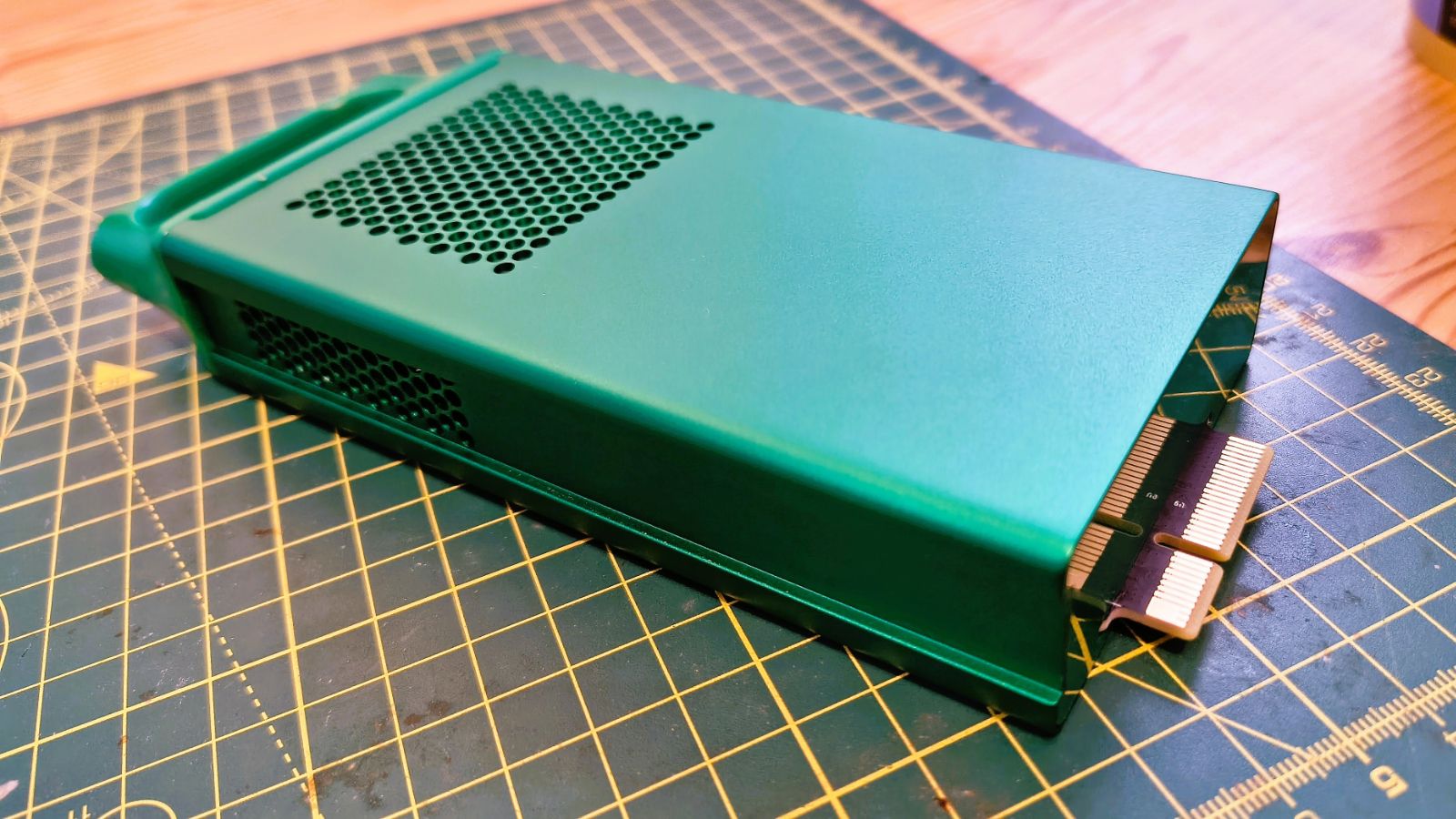
Coming back to the HA100, the basis for my experience so far, the T20 accelerator on this machine is modest, yet it took up most of the free PCIe lanes, leaving only a single lane for the M.2 slot, once all the other ports were covered.
Given the price, I think it should have shared an architecture with the DXP4800 Pro, or better, and maybe had either dual M.2 slots, Gen 3 x4 or a single Gen4 x4 slot. Because Gen3 x1 is only 1000MB/s, and external devices on this machine can go that quickly.
I guess, based on the number of pledges they get, Ugreen will know whether the performance ramp from the HA100 to the HA100 Pro and the MA100 was right or wrong.
My feeling, and it’s a gut reaction, is that all the systems should have shared the same enclosure, the HA100 should have been more powerful, and there should have been more consideration given to a potential upgrade path, at least from the HA100 to the HA100 Pro.
Ugreen HomeAgent HA100: Software
- UGOS Pro
- Local Gwen 3.5
- Smart Home
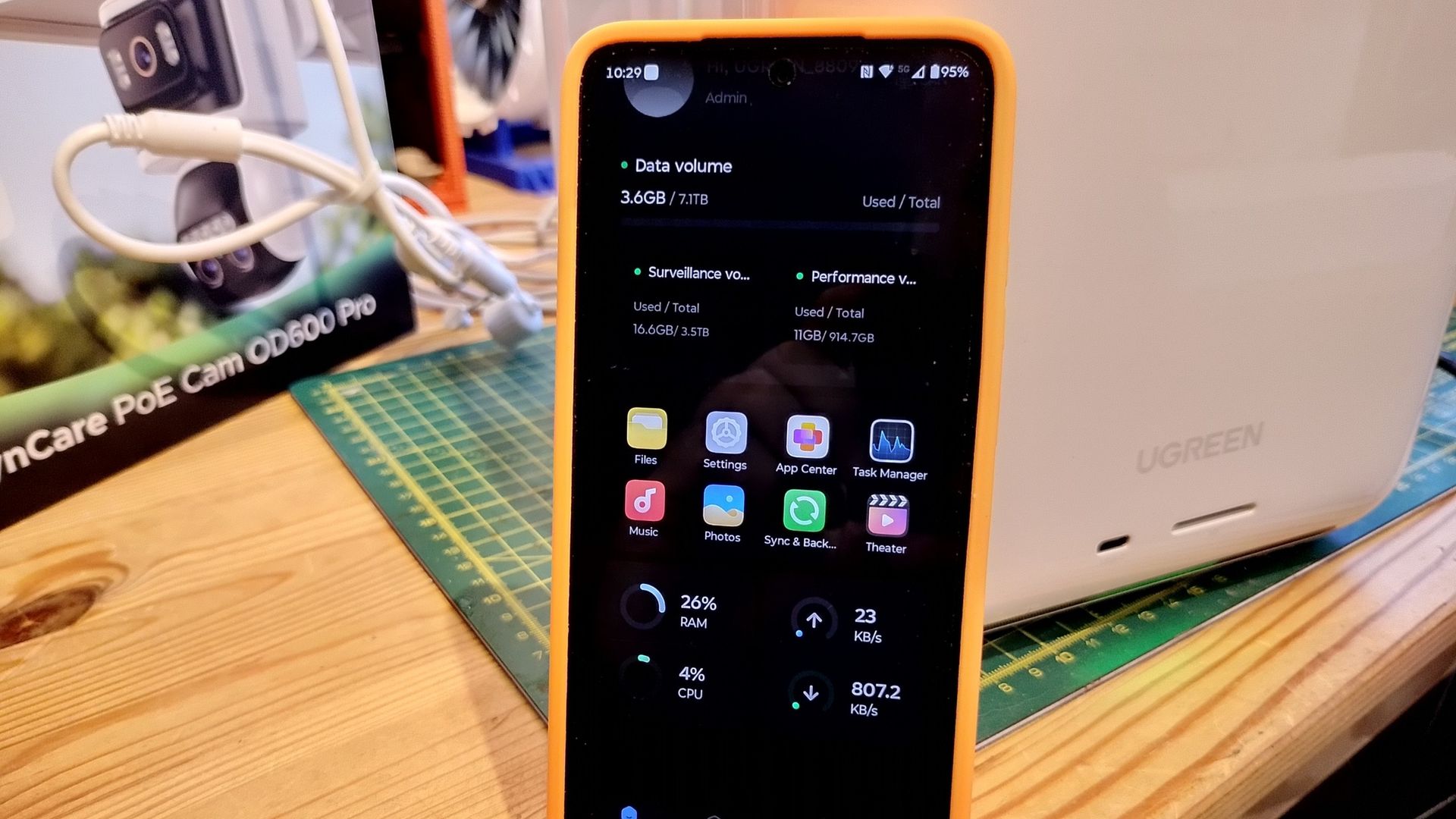
The hardware in this series is effectively done, and I’d be massively surprised if anything changes between the machines reviewers received and what ultimately arrives for those on Kickstarter and in later retail.
That leaves the software side of the equation, and it isn’t at the same stage of production, even if it is underpinned by the same UGOS Pro platform as all the DH, DXP, and iDX NAS Ugreen has already launched.
However, at the time of writing, my DXP8800 Plus workhorse is running UGOS Pro 1.20.0.0142 and the HomeAgent HA100 is on 1.20.0.0127 Beta.
That might not seem hugely different, but there are significant differences between the two, so much that the HomeAgent machine needs a special version of the mobile application to even be accessible.
It seems reasonable to assume that closer to retail release, all the extra functionality needed for HomeAgent will be settled into the latest general-purpose UGOS Pro release, rather than it spawning a whole new separate OS.
The biggest difference anyone who has used UGOS Pro will notice is that you can’t access this version from a web interface, although Ugreen has promised that in a future update.
Using it from the mobile app doesn’t limit what you can control, but it's nice to use the web interface when it's available.
It’s a generalisation, but the NAS side of the HomeAgent is practically identical to that in prior Ugreen NAS, where you can install apps, manage the drives and data. Obviously, in this configuration with only two data drives, you can’t configure a RAID 5 pack, but you can configure RAID 0 or 1, and you can create backups to another NAS.
The app selection is mostly the same as that on the standard NAS, with a couple of special function apps that bind the T20 accelerator into the system and an IoT Gateway that are loaded by default. What’s genuinely interesting is how some of the apps we’ve seen before on UGOS Pro now have added significance in this context.
The one that stands out most is Model Manager, since the whole AI function of this system is built around a locally run AI on this app using Docker as a subsystem. By default, the system loads the LLM Qwen 3.5 4B.
This 4B model is a sensible fit for this hardware, as being quantised, it occupies only a few gigabytes, which leaves plenty of the 16GB for the operating system and camera analysis running alongside it. Anything much larger would start to squeeze this box.
To try and make things as efficient as possible, the model has modules that you can either install or not depending on if you want it to recognise people, pets or even the appearance of a parcel. As these features infer, it works closely with Surveillance Centre and the new camera peripherals.
It can also link to Smart Home functionality, enabling it to turn things on and off, like lights and also read temperature and security sensors.
The HomeAgent box and some of the peripherals, such as the SynCare cameras and the Smart Speaker, allow you to verbally interact with an AI assistant, Uliya.
And frankly, this is where things need some considerable work. While the hardware in the HA100 can process 40 or more tokens a second, I’d hardly describe it as conversational.
It can alert you when someone is approaching the house, has left a package, or where a known person is in the home, but ask it anything more complicated, and it often says it can’t do that yet.
While I’ve not tried the HA100 Pro or the MA100, I’d assume they can run much more sophisticated LLMs with greater capabilities, but the AI component of the basic system is more agentic-focused than something like ChatGPT.
That said, you can plug a Cloud-based AI in alongside Qwen 3.5. The current options are OpenAI (ChatGPT), Qwen, MiniMax, DeepSeek, GLM and Kimi, and you will need an API key to plug those in.
However, Ugreen made it clear that the purpose of the HomeAgent was to provide a local AI that wasn’t dependent on the internet, so using a Cloud model undermines that assertion.
Obviously, the engineers can do plenty with the local Qwen 3.5 4B model to make it more interactive and able to handle a wider range of scenarios, but at this point in development, it is rather underwhelming.
The other part of this solution that needs considerable effort is the Smart Home app, since currently it only connects to the associated Ugreen peripherals or Matter-compliant devices.
Since all my home automation hardware is older and doesn’t use Matter, that’s a problem.
I did consider using the Matter Hub on my Home Assistant installation to make non-Matter hardware visible, but the way this is handled on the HA100 requires either a Matter QR code or pairing number. At a minimum, this needs to be expanded to include older Google and Amazon equipment, as well as popular brands like Tapo, SmartLife, and Hue.
I’m sure these things will be added, but unless you have Matter hardware or Ugreen peripherals, it's a bit of a technological desert right now. Once these items become part of this ecosystem, you can easily build automations and interact with Uliya to control them, or that’s the promise.
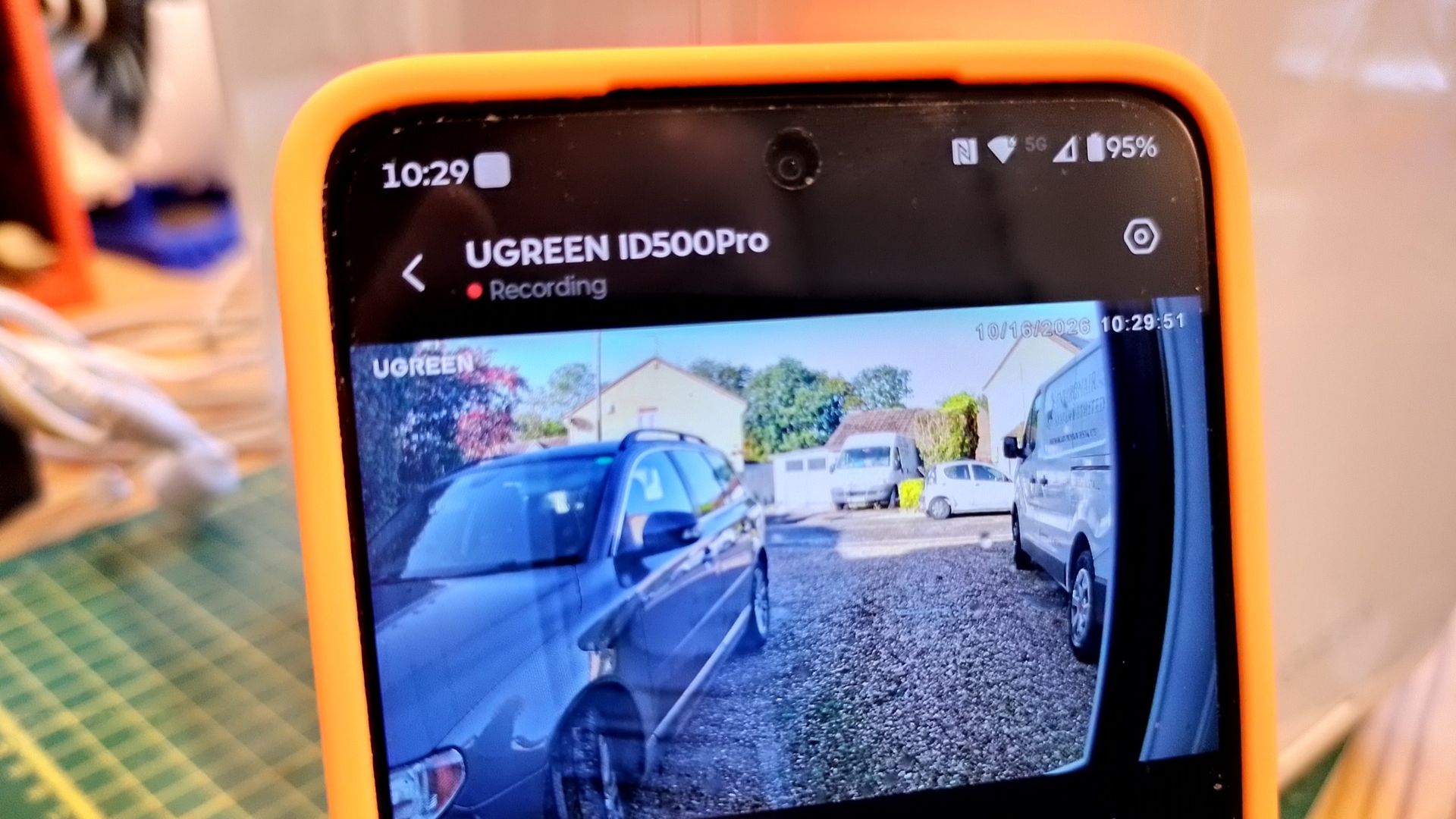
For my assessment, Ugreen provided two peripherals: the SynCare ID500 Pro and the SynCare OD600 Pro. If you didn’t connect the dots, ID is for indoors and OD is for outdoors.
The ID500 Pro, which you can get for only $89 as part of the Kickstarter offering, comes for free with the HA100 and HA100 Pro. This device gets power via USB and comes with a phone-style power source and a long USB cable.
Equipped with a 4K camera on a smooth pan-tilt tracking system that enables it to follow movement automatically across a room or even outdoors. Working with AI, it can identify people, vehicles, pets, and packages, and record those events on the HomeAgent for later review.
The only issue I ran into was that I put it in a window to cover anyone approaching, and it did that well, but at night, when it turned on its IR lights for night vision, it blinded itself with the IR reflection off the glass.
Undoubtedly, a superior option for tracking outside activity is the OD600 Pro, which is designed to be mounted outside, ideally on the eaves of a property. It has dual cameras and takes its power from a PoE LAN connection, allowing it to be directly connected with a single LAN cable to the HomeAgent PoE switch. A more advanced version, the OD800 Pro, includes a solar panel and battery to power the camera and can use Wi-Fi, so it can be installed without cabling.
I'm slightly disappointed the PoE ports are only 10/100 and not gigabit or even 2.5GbE, but that's a choice Ugreen made.
As part of the launch, the OD600 Pro can be had for $159 (MSRP $269) and the OD800 Pro for $199 (MSRP $339), which, given their specifications and build quality, seems a good deal. Hopefully, the devices will also work with an ordinary Ugreen NAS at some point, because they don’t currently.
Having been part of the original DXP NAS launch, HomeAgent has a strong element of things repeating themselves. However, since UGOS Pro has had two or more years of development, the underlying platform is more mature.
Updates for the extra HomeAgent part of this package are arriving often, and things are improving, but with the Kickstarter about to officially begin, and its end a few months away, this solution needs to become much more sophisticated quickly.
Today, it’s another Ugreen work in progress, but UGOS Pro was one not so long ago.
Ugreen HomeAgent HA100: Early verdict
First, I think it's far too early in the HA100's gestation to fully appreciate what this device might accomplish, since much of the software side of this equation isn’t nearly complete.
That said, when Ugreen first launched the NASync DXP series globally, UGOS Pro looked decidedly primitive, and two and a half years later it is much more sophisticated.
It wouldn’t be unrealistic to expect it to be much more functional by the time this hardware hits retail, and to continue rapid development from there.
Where I’m less on board is the three different platforms, each based on a unique platform and with a different accelerator.
The HA100 is built on a Rockchip RK3588, the HA100 Pro uses the CIX-CP8180(P1), which previously appeared in the Minisforum MS-R1 ARM workstation, and the MA100 is powered by the NVIDIA Jetson Thor T5000.
The problem with this range is that even if the accelerator modules are removable, there isn’t an upgrade path that can take you between these options. Had the HA100 and HA100 Pro had a common platform, that would have made sense, with the differences being in the accelerator module.
But since the accelerator on the HA100 uses a PCIe 3.0 slot, and the one on the HA100 Pro uses a PCIe 4.0 slot, then that was never going to work.
Unfortunately, upgrading forces you to buy an entirely new machine if you want more AI power.
I also have some negative feelings about having a NAS for home use with the potential of a $20,000 price tag. But that version's future depends on a company now utterly dependent on the AI bubble not bursting, which seems, at best, unrealistic.
I’ve been a big supporter of what Ugreen has done with its NAS products; since before they arrived on the scene, things seemed disturbingly cosy between the various NAS brands.
The HomeAgent is their most ambitious leap yet, since it glues two elements together in a way few users are considering until now. People who like NAS understand what it offers and how it's used, whereas AI has unresolved PR issues, a less defined use case, and users who are either negative or, at best, agnostic about AI.
The HA100 is a product Ugreen created to elevate NAS with AI, but it could just as easily drag it down. Only time will tell, but for those who want to ride, the tickets start at $50 for a reservation.
To crystallise my thoughts, there are two ways to think about HomeAgent hardware, and I’m not inclined to favour either. One is that these represent a new hybrid type of appliance where AI and local information come together, creating new efficiencies and fewer dependencies on external services. Or, from this point onwards, all NAS will have a shell of AI logic around them, and the era of dumb NAS will soon be behind us.
Either way, the NAS market needs to buckle up, because this ride could get bumpy.
For more compact computing, see our guide to the best mini PCs you can buy




